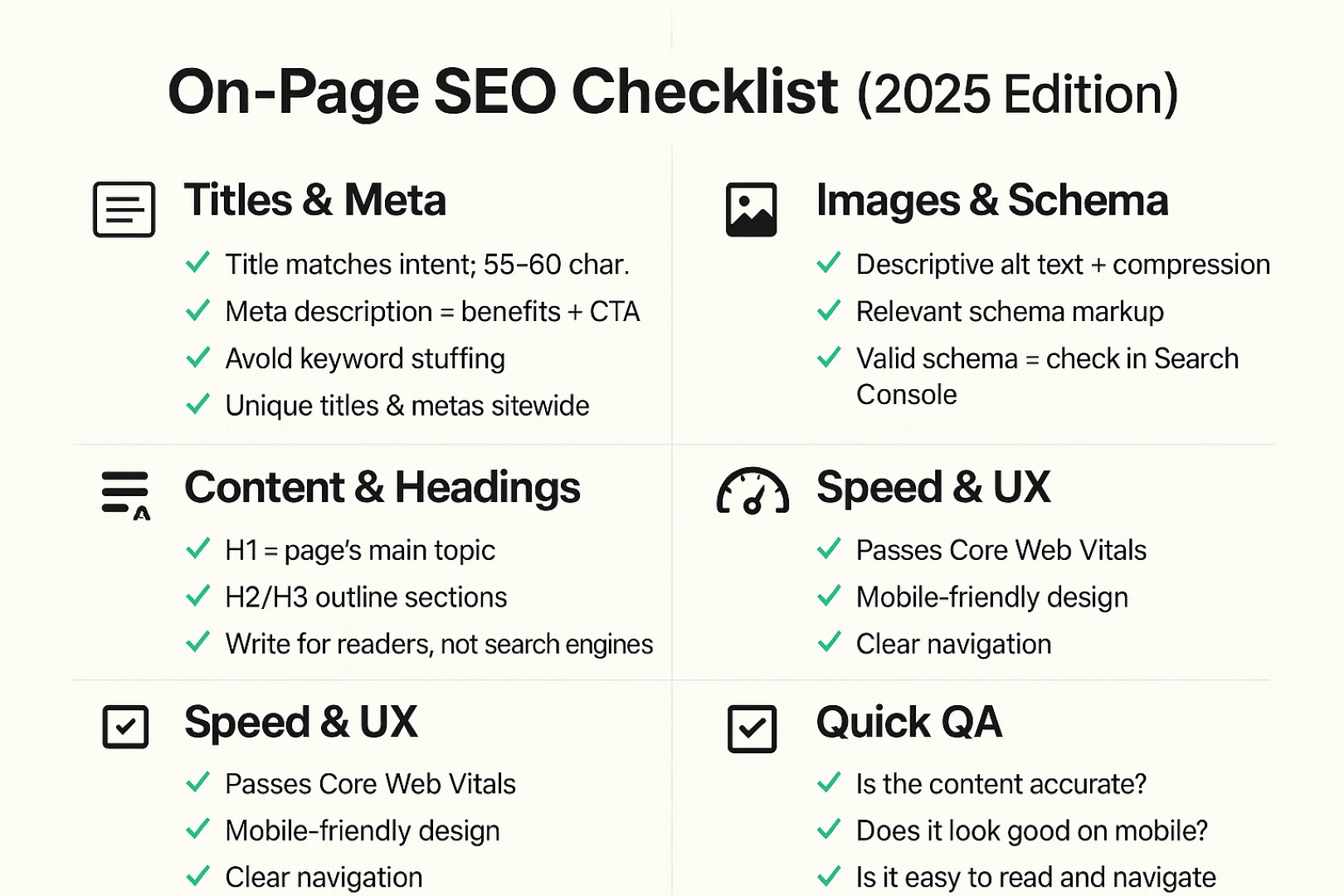
Quick take:
on-page SEO isn’t about ticking boxes—it’s about making every page stupid-simple for both people and search engines to understand, load, navigate, and trust. If you focus on clarity, intent, and experience, rankings tend to follow.
Who this is for
- New website owners starting from zero and wanting a clear, do-this-first roadmap
- Existing site owners who need a modern refresh (without breaking everything)
- Teams targeting the US, Canada, and EU who need to handle regional nuances, languages, and compliance gracefully
What you’ll get
- A field-tested checklist you can use on every page
- Clear, actionable examples (titles, meta descriptions, headings, URLs, and more)
- Practical international tips for US/CA/EU audiences
- Links to trustworthy guidance so you’re not guessing
1) What Is On-Page SEO (and Why It Matters Now)
On-page SEO covers everything you control on a single page—from titles, headings, copy, and media to internal links, schema, and page performance. Nail this first because:
- It’s the foundation your off-page efforts amplify
- It directly shapes click-through rate (CTR), crawlability, and indexing
- It’s the cheapest SEO you’ll ever do: mostly time + process
2) The 20/80 of On-Page SEO: Do These First
If you only do five things, do these:
- Write a human-first title that matches intent (don’t stuff; be specific; be concise). Google may rewrite title links if yours are vague, stuffed, or boilerplate—so follow their guidance to increase the odds that your title shows as written. (Google for Developers)
- Craft a compelling meta description to earn the click. It’s not a direct ranking factor, but it influences CTR—which determines whether your great content gets seen. (Search Engine Journal)
- Use a clean URL that says what the page is about (/on-page-seo-best-practices, not /id=123), uses hyphens, and avoids clutter. (Google for Developers)
- Structure your content with H1/H2/H3 so scanners can grasp it in 5 seconds. Match the sections to the searcher’s journey (what, why, how, examples, FAQs).
- Make it fast and stable—Core Web Vitals are a (lightweight but real) ranking signal and a big UX win. (Search Engine Land)
For businesses looking to go beyond these fundamentals with custom audits and strategies, Future Peak Digital offers tailored SEO solutions.
3) Titles That Win: Clear, Specific, Clickable
Your goal: Reflect the query’s intent in 55-ish characters without fluff.
Best practices
- Lead with the core topic + value (“On-Page SEO Checklist for New Sites”)
- Add a differentiator if you have space (“+ Free Template”)
- Avoid boilerplate across the whole site (“| Brand” everywhere) unless it adds clarity
- Don’t keyword-stuff or mislead—Google may replace your title link if it doesn’t match the page. (Google for Developers)
Title templates you can steal
- Primary Keyword: The [Audience/Use Case] Guide
- Primary Keyword in 2025: [Angle/Outcome]
- Primary Keyword Checklist: [X] Steps to [Result]
Quick QA before you publish
- Does the title make sense out of context?
- Could a skimmer predict the contents?
- Would you click it?
4) Meta Descriptions That Earn the Click
Remember: meta descriptions don’t directly rank pages, but they influence CTR (and CTR determines whether your page compounds traffic). (Search Engine Journal)
Write it like ad copy
- Promise a specific outcome (“Steal a 20-point on-page SEO checklist…”)
- Preview 2–3 key wins (speed, structure, internal links)
- Invite action (“Get the template →”)
Formula
[Audience] + [Problem/Goal] + [Specific benefits] + [CTA]
Examples
- “New website owner? Use this on-page SEO checklist to write better titles, fix URLs, and pass Core Web Vitals—fast. Download the template.”
- “Update an existing site for 2025: fix headings, internal links, schema, and speed. See examples and copy-paste snippets.”
5) Heading Structure That Guides Readers (and Crawlers)
Rules of thumb
- H1: One per page; describe the page like a book title
- H2s: Main sections (what/why/how/examples/FAQ)
- H3+: Steps, sub-points, FAQs
- Sprinkle natural keyword variants—no stuffing
- Make sections short and skimmable (lists, short paragraphs, bold key phrases)
Skimmability tricks
- Open sections with a 1–2 sentence setup
- Prefer bullets over long blocks
- Insert mini-summaries at the end of dense sections
6) URLs People (and Google) Understand
Keep them:
- Short, descriptive, hyphenated (/seo/on-page-seo-checklist)
- Stable (avoid changing later—redirects are never “free”)
- Language-appropriate when localizing (use each audience’s language)
- Free of noise (IDs, tracking params, underscores, deep nesting)
Why it matters: It helps users trust the click and helps Google understand context. See Google’s official URL structure best practices. (Google for Developers)
7) Content That Satisfies Intent (Without Keyword Stuffing)
Map searcher intent
- Informational: definitions, frameworks, checklists, examples
- Commercial: comparisons, pricing, ROI proof, “vs.” pages
- Transactional: benefits, proof, risk reversal, FAQs, CTAs
Use semantic coverage
- Include related subtopics a real expert would naturally cover (e.g., in on-page SEO: titles, headings, URLs, internal links, images/alt text, schema, speed).
Write for scanners, then readers
- 1 idea per paragraph
- Lists for steps, ingredients, settings, rules
- Pull-quotes or callouts for key tips
8) Internal Linking: Your Most Underrated Ranking Lever
Internal links distribute context and authority, help Google discover pages faster, and guide humans to their next best click. Done consistently, they’re a compounding asset. (Search Engine Journal)
Principles
- Every important page should have multiple internal links pointing to it
- Use descriptive anchor text (“on-page SEO checklist,” not “click here”)
- Cluster by topic: pillar page → supporting guides → tools/templates → case studies
- Keep it natural—link where it helps the reader
- Fix orphan pages (no internal links in or out)
Quick process
- When you publish a new page, add 2–5 internal links to it from existing relevant pages.
- Add 2–5 internal links from it to your most relevant targets.
- Audit quarterly: fix broken links; remove chains and unnecessary redirect hops.
9) Images & Alt Text: Accessibility + Discoverability
Image optimization is half UX/accessibility and half context for search engines.
Write meaningful alt text for content-relevant images; skip or use empty alt=”” for purely decorative graphics. (This guidance aligns with Google’s image/alt text principles as summarized across Search Central and reputable industry coverage.) (Search Engine Journal)
Best practices
- Describe the image’s purpose, not just the object (“on-page SEO checklist, step 1–5, marked complete”)
- Keep alt text concise and natural; avoid stuffing
- Use modern formats (WebP/AVIF when possible) and compress
- Lazy-load below-the-fold images
10) Page Speed & Core Web Vitals (CWV)
If your page loads fast, responds quickly, and doesn’t jump around, users stay longer and convert more. Google has clarified that Core Web Vitals are used by its ranking systems (not the only thing, but they matter). (Search Engine Land)
Targets (as of 2025)
- LCP fast (optimize hero images, serve from CDN)
- INP responsive (minimize main-thread work; limit heavy JS)
- CLS stable (reserve space for media/ads; avoid layout shifts)
Quick fixes
- Compress & properly size hero images
- Inline critical CSS; defer non-critical JS
- Remove render-blocking plugins, bulky sliders, unused CSS/JS
- Cache aggressively; use a reputable CDN
11) Schema (Structured Data): Eligibility, Not a Guarantee
Why bother: Schema helps Google understand your content and may unlock rich results (stars, FAQs, product data). Valid schema makes you eligible—it doesn’t guarantee display. Use Search Console’s Rich Result reports to validate and monitor types you implement. (Google Help)
Where to start
- Articles/BlogPosting (publisher, date, headline)
- Product (name, price, availability, review)
- FAQ (only if the page contains real Q&A content)
- Organization/LocalBusiness (name, logo, contact)
- Event/Recipe/HowTo (if relevant)
Key reminders
- Mark up what’s visible on the page
- Keep data accurate and updated
- Validate with Search Console’s Rich Results tools and address errors. (Google Help)
12) UX Signals You Can Control (That Readers Feel)
Search engines reward useful pages that satisfy intent. Improve the things visitors feel:
- Readable typography (16–18px+ body, 1.6–1.8 line-height)
- Generous white space and short paragraphs
- Meaningful subheads every 150–250 words
- Sticky TOC for long guides (anchor links)
- Inline CTAs that match content intent (download, calculator, quote)
- Trust markers: authorship, updated dates, contact info, refund/returns (when relevant)
13) Regional & International Notes (US, Canada, EU)
Language & spelling
- Pick a primary dialect per page (en-US, en-CA, en-GB, fr-FR, de-DE…) and stick to it in copy, schema, and currency.
- If you host localized versions, use hreflang annotations so Google understands which version to show by language/region (the official docs describe this system—any localized variant of Google’s “Localized versions of your page” guidance applies). (Google for Developers)
Compliance & UX
- Consent banners: keep them lightweight; avoid CLS by reserving space
- Shipping, taxes, and legal pages: clear, crawlable, and linked in the footer
- Local trust: addresses, phone numbers, pricing in local currency, local reviews
Multilingual structure options
- Subdirectories (example.com/fr/) for consolidation
- ccTLDs for strong country signals (higher overhead)
- Subdomains if teams/content are siloed
(Ensure your URLs, titles, schema, and sitemaps reflect the chosen approach.)
14) Common On-Page Mistakes to Avoid
- Keyword stuffing in titles, headings, alt text, or anchors
- Duplicate titles and thin, near-duplicate pages
- Bloated URLs with IDs, tracking parameters, underscores, or deep nests (see Google’s URL best practices). (Google for Developers)
- No internal links (or only linking “related posts” once)
- Image-only content with no descriptive alt text
- Aggressive pop-ups that block content on mobile (and cause shifts)
- Ignoring performance until after design is “done”
- Assuming schema guarantees rich results (it doesn’t). (Google Help)
15) Tools You Can Use (Free → Paid)
Free
- Google Search Console: coverage, enhancements, rich result eligibility
- PageSpeed Insights/Lighthouse: Core Web Vitals basics
- Chrome UX Report (CrUX) data (via PSI)
- Screaming Frog (free mode): titles, headings, meta, status codes
Paid (nice-to-have)
- Ahrefs / Semrush (keywords, SERP features, internal link audits)
- Sitebulb / Screaming Frog (full) (site audits at scale)
- Surfer / Clearscope (content depth and topical coverage)
16) Your Reusable On-Page SEO Checklist
Before drafting
- Define one primary query + intent
- Identify secondary topics a good answer should cover
- Decide title angle and URL
While writing
- H1 matches searcher intent
- H2/H3 outline answers, steps, examples, FAQs
- Paragraphs are short; lists where possible
- Include original data, examples, screenshots, or templates
- Add internal links to and from relevant pages
After drafting
- Title: clear, specific, concise; avoid boilerplate
- Meta description: benefits + CTA (even if Google rewrites the snippet) (Search Engine Journal)
- URL: short, hyphenated, descriptive (Google for Developers)
- Images: compressed, alt text for meaningful images; lazy-load
- Schema: relevant + valid; monitor in Rich Results reports (Google Help)
- Internal links: add inbound from older posts and outbound to key resources
- Performance: pass CWV (hero optimization, defer JS, cache/CDN) (Search Engine Land)
17) Example: Turning a “Meh” Page into a High-Performer
Scenario: You have “/services/seo” with a vague title, bloated copy, and no structure.
Fix it in under an hour
- Title: “SEO Services for Small Businesses (Plans, Pricing & ROI)”
- URL: /services/seo → keep if already indexed; otherwise /seo-services for clarity
- H1/H2s:
- H1: SEO Services for Small Businesses
- H2: What You Get (Audit, On-Page, Technical, Content, Links)
- H2: Pricing & Packages (US/CA/EU)
- H2: Case Studies & Outcomes (Traffic, Leads, Sales)
- H2: FAQs (Timelines, Guarantees, Contracts)
- H1: SEO Services for Small Businesses
- Content: Replace vague claims with specifics (deliverables, timelines, proof)
- Internal links: From blog posts on on-page SEO, technical audits, content strategy
- Schema: Organization + Service + FAQ (if genuine Q&A)
- Speed: Compress hero image, lazy-load logos, defer chat widget
18) FAQ
Q: Do meta descriptions impact rankings?
A: Not directly—they influence CTR, which influences whether your content gets traction. Still worth writing excellent ones. (Search Engine Journal)
Q: How long should my title be?
A: There’s no magic number. Aim for concise clarity that fits typical SERP display widths and matches the page content; Google may choose an alternative if yours is misleading or overly long. Follow their title link guidance. (Google for Developers)
Q: Are Core Web Vitals worth the effort?
A: Yes—for UX and modest ranking benefits. They’re part of Google’s ranking systems; treat them as table stakes. (Search Engine Land)
Q: Does schema guarantee rich results?
A: No—valid schema makes you eligible, not guaranteed. Monitor in Search Console’s Rich Result reports. (Google Help)
Q: How many internal links should I add?
A: There’s no perfect count—prioritize relevance and clarity. Ensure key pages receive several natural, descriptive links from related content. (Search Engine Journal)
19) Put It All Together (Mini Playbook)
For every new page
- Draft title + URL + H1 first
- Outline H2/H3s from searcher questions
- Write scannable sections with lists and examples
- Add images with alt text and a table of contents
- Link to 3–5 relevant pages and secure 2–5 internal links from existing pages
- Add relevant schema (validate)
- Publish → Performance check (PSI/Lighthouse) → quick CWV fixes
For existing pages (quick wins)
- Improve the title to match intent (and reduce rewrites by Google) (Google for Developers)
- Tighten the intro (promise, preview, proof)
- Add subheads & lists; break up walls of text
- Add/remove internal links to reflect your current priorities
- Fix bloat (heavy JS, oversized images) and re-test CWV (Search Engine Land)
- Re-submit in Search Console if you made substantial changes
20) Final Thought
On-page SEO in 2025 is clarity at scale: concise titles, clean URLs, structured content, smart interlinking, valid schema, and fast, stable pages. Do that consistently and you’ll outrun most competitors—especially in markets where trust and usability matter (US, Canada, EU).
You’ve got the framework. If you’d like, I can take one of your pages and apply this checklist end-to-end—titles, structure, internal links, schema, and a quick CWV tune-up.
Sources & further reading (key references)
- Google: Influencing title links—why Google rewrites and how to prevent it. (Google for Developers)
- Google: URL structure best practices—short, descriptive, hyphenated, and stable. (Google for Developers)
- Search Engine Land: Core Web Vitals clarified as a ranking signal. (Search Engine Land)
- Search Engine Journal: Meta descriptions aren’t a direct ranking factor (but matter for CTR). (Search Engine Journal)
- Google Search Console Help: Rich results—valid structured data is eligible (not guaranteed). (Google Help)
- Search Engine Journal: Internal linking & site structure—why it’s foundational. (Search Engine Journal)
On-Page SEO Best Practices for 2025 (A No-Fluff Guide for New & Growing Sites in the US, Canada, and the EU)
Quick take: on-page SEO isn’t about ticking boxes—it’s about making every page stupid-simple for both people and search engines to understand, load, navigate, and trust. If you focus on clarity, intent, and experience, rankings tend to follow.
Who this is for
- New website owners starting from zero and wanting a clear, do-this-first roadmap
- Existing site owners who need a modern refresh (without breaking everything)
- Teams targeting the US, Canada, and EU who need to handle regional nuances, languages, and compliance gracefully
What you’ll get
- A field-tested checklist you can use on every page
- Clear, actionable examples (titles, meta descriptions, headings, URLs, and more)
- Practical international tips for US/CA/EU audiences
- Links to trustworthy guidance so you’re not guessing
1) What Is On-Page SEO (and Why It Matters Now)
On-page SEO covers everything you control on a single page—from titles, headings, copy, and media to internal links, schema, and page performance. Nail this first because:
- It’s the foundation your off-page efforts amplify
- It directly shapes click-through rate (CTR), crawlability, and indexing
- It’s the cheapest SEO you’ll ever do: mostly time + process
2) The 20/80 of On-Page SEO: Do These First
If you only do five things, do these:
- Write a human-first title that matches intent (don’t stuff; be specific; be concise). Google may rewrite title links if yours are vague, stuffed, or boilerplate—so follow their guidance to increase the odds that your title shows as written. (Google for Developers)
- Craft a compelling meta description to earn the click. It’s not a direct ranking factor, but it influences CTR—which determines whether your great content gets seen. (Search Engine Journal)
- Use a clean URL that says what the page is about (/on-page-seo-best-practices, not /id=123), uses hyphens, and avoids clutter. (Google for Developers)
- Structure your content with H1/H2/H3 so scanners can grasp it in 5 seconds. Match the sections to the searcher’s journey (what, why, how, examples, FAQs).
- Make it fast and stable—Core Web Vitals are a (lightweight but real) ranking signal and a big UX win. (Search Engine Land)
3) Titles That Win: Clear, Specific, Clickable
Your goal: Reflect the query’s intent in 55-ish characters without fluff.
Best practices
- Lead with the core topic + value (“On-Page SEO Checklist for New Sites”)
- Add a differentiator if you have space (“+ Free Template”)
- Avoid boilerplate across the whole site (“| Brand” everywhere) unless it adds clarity
- Don’t keyword-stuff or mislead—Google may replace your title link if it doesn’t match the page. (Google for Developers)
Title templates you can steal
- Primary Keyword: The [Audience/Use Case] Guide
- Primary Keyword in 2025: [Angle/Outcome]
- Primary Keyword Checklist: [X] Steps to [Result]
Quick QA before you publish
- Does the title make sense out of context?
- Could a skimmer predict the contents?
- Would you click it?
4) Meta Descriptions That Earn the Click
Remember: meta descriptions don’t directly rank pages, but they influence CTR (and CTR determines whether your page compounds traffic). (Search Engine Journal)
Write it like ad copy
- Promise a specific outcome (“Steal a 20-point on-page SEO checklist…”)
- Preview 2–3 key wins (speed, structure, internal links)
- Invite action (“Get the template →”)
Formula
[Audience] + [Problem/Goal] + [Specific benefits] + [CTA]
Examples
- “New website owner? Use this on-page SEO checklist to write better titles, fix URLs, and pass Core Web Vitals—fast. Download the template.”
- “Update an existing site for 2025: fix headings, internal links, schema, and speed. See examples and copy-paste snippets.”
5) Heading Structure That Guides Readers (and Crawlers)
Rules of thumb
- H1: One per page; describe the page like a book title
- H2s: Main sections (what/why/how/examples/FAQ)
- H3+: Steps, sub-points, FAQs
- Sprinkle natural keyword variants—no stuffing
- Make sections short and skimmable (lists, short paragraphs, bold key phrases)
Skimmability tricks
- Open sections with a 1–2 sentence setup
- Prefer bullets over long blocks
- Insert mini-summaries at the end of dense sections
6) URLs People (and Google) Understand
Keep them:
- Short, descriptive, hyphenated (/seo/on-page-seo-checklist)
- Stable (avoid changing later—redirects are never “free”)
- Language-appropriate when localizing (use each audience’s language)
- Free of noise (IDs, tracking params, underscores, deep nesting)
Why it matters: It helps users trust the click and helps Google understand context. See Google’s official URL structure best practices. (Google for Developers)
7) Content That Satisfies Intent (Without Keyword Stuffing)
Map searcher intent
- Informational: definitions, frameworks, checklists, examples
- Commercial: comparisons, pricing, ROI proof, “vs.” pages
- Transactional: benefits, proof, risk reversal, FAQs, CTAs
Use semantic coverage
- Include related subtopics a real expert would naturally cover (e.g., in on-page SEO: titles, headings, URLs, internal links, images/alt text, schema, speed).
Write for scanners, then readers
- 1 idea per paragraph
- Lists for steps, ingredients, settings, rules
- Pull-quotes or callouts for key tips
8) Internal Linking: Your Most Underrated Ranking Lever
Internal links distribute context and authority, help Google discover pages faster, and guide humans to their next best click. Done consistently, they’re a compounding asset. (Search Engine Journal)
Principles
- Every important page should have multiple internal links pointing to it
- Use descriptive anchor text (“on-page SEO checklist,” not “click here”)
- Cluster by topic: pillar page → supporting guides → tools/templates → case studies
- Keep it natural—link where it helps the reader
- Fix orphan pages (no internal links in or out)
Quick process
- When you publish a new page, add 2–5 internal links to it from existing relevant pages.
- Add 2–5 internal links from it to your most relevant targets.
- Audit quarterly: fix broken links; remove chains and unnecessary redirect hops.
9) Images & Alt Text: Accessibility + Discoverability
Image optimization is half UX/accessibility and half context for search engines.
Write meaningful alt text for content-relevant images; skip or use empty alt=”” for purely decorative graphics. (This guidance aligns with Google’s image/alt text principles as summarized across Search Central and reputable industry coverage.) (Search Engine Journal)
Best practices
- Describe the image’s purpose, not just the object (“on-page SEO checklist, step 1–5, marked complete”)
- Keep alt text concise and natural; avoid stuffing
- Use modern formats (WebP/AVIF when possible) and compress
- Lazy-load below-the-fold images
10) Page Speed & Core Web Vitals (CWV)
If your page loads fast, responds quickly, and doesn’t jump around, users stay longer and convert more. Google has clarified that Core Web Vitals are used by its ranking systems (not the only thing, but they matter). (Search Engine Land)
Targets (as of 2025)
- LCP fast (optimize hero images, serve from CDN)
- INP responsive (minimize main-thread work; limit heavy JS)
- CLS stable (reserve space for media/ads; avoid layout shifts)
Quick fixes
- Compress & properly size hero images
- Inline critical CSS; defer non-critical JS
- Remove render-blocking plugins, bulky sliders, unused CSS/JS
- Cache aggressively; use a reputable CDN
11) Schema (Structured Data): Eligibility, Not a Guarantee
Why bother: Schema helps Google understand your content and may unlock rich results (stars, FAQs, product data). Valid schema makes you eligible—it doesn’t guarantee display. Use Search Console’s Rich Result reports to validate and monitor types you implement. (Google Help)
Where to start
- Articles/BlogPosting (publisher, date, headline)
- Product (name, price, availability, review)
- FAQ (only if the page contains real Q&A content)
- Organization/LocalBusiness (name, logo, contact)
- Event/Recipe/HowTo (if relevant)
Key reminders
- Mark up what’s visible on the page
- Keep data accurate and updated
- Validate with Search Console’s Rich Results tools and address errors. (Google Help)
12) UX Signals You Can Control (That Readers Feel)
Search engines reward useful pages that satisfy intent. Improve the things visitors feel:
- Readable typography (16–18px+ body, 1.6–1.8 line-height)
- Generous white space and short paragraphs
- Meaningful subheads every 150–250 words
- Sticky TOC for long guides (anchor links)
- Inline CTAs that match content intent (download, calculator, quote)
- Trust markers: authorship, updated dates, contact info, refund/returns (when relevant)
13) Regional & International Notes (US, Canada, EU)
Language & spelling
- Pick a primary dialect per page (en-US, en-CA, en-GB, fr-FR, de-DE…) and stick to it in copy, schema, and currency.
- If you host localized versions, use hreflang annotations so Google understands which version to show by language/region (the official docs describe this system—any localized variant of Google’s “Localized versions of your page” guidance applies). (Google for Developers)
Compliance & UX
- Consent banners: keep them lightweight; avoid CLS by reserving space
- Shipping, taxes, and legal pages: clear, crawlable, and linked in the footer
- Local trust: addresses, phone numbers, pricing in local currency, local reviews
Multilingual structure options
- Subdirectories (example.com/fr/) for consolidation
- ccTLDs for strong country signals (higher overhead)
- Subdomains if teams/content are siloed
(Ensure your URLs, titles, schema, and sitemaps reflect the chosen approach.)
14) Common On-Page Mistakes to Avoid
- Keyword stuffing in titles, headings, alt text, or anchors
- Duplicate titles and thin, near-duplicate pages
- Bloated URLs with IDs, tracking parameters, underscores, or deep nests (see Google’s URL best practices). (Google for Developers)
- No internal links (or only linking “related posts” once)
- Image-only content with no descriptive alt text
- Aggressive pop-ups that block content on mobile (and cause shifts)
- Ignoring performance until after design is “done”
- Assuming schema guarantees rich results (it doesn’t). (Google Help)
15) Tools You Can Use (Free → Paid)
Free
- Google Search Console: coverage, enhancements, rich result eligibility
- PageSpeed Insights/Lighthouse: Core Web Vitals basics
- Chrome UX Report (CrUX) data (via PSI)
- Screaming Frog (free mode): titles, headings, meta, status codes
Paid (nice-to-have)
- Ahrefs / Semrush (keywords, SERP features, internal link audits)
- Sitebulb / Screaming Frog (full) (site audits at scale)
- Surfer / Clearscope (content depth and topical coverage)
16) Your Reusable On-Page SEO Checklist
Before drafting
- Define one primary query + intent
- Identify secondary topics a good answer should cover
- Decide title angle and URL
While writing
- H1 matches searcher intent
- H2/H3 outline answers, steps, examples, FAQs
- Paragraphs are short; lists where possible
- Include original data, examples, screenshots, or templates
- Add internal links to and from relevant pages
After drafting
- Title: clear, specific, concise; avoid boilerplate
- Meta description: benefits + CTA (even if Google rewrites the snippet) (Search Engine Journal)
- URL: short, hyphenated, descriptive (Google for Developers)
- Images: compressed, alt text for meaningful images; lazy-load
- Schema: relevant + valid; monitor in Rich Results reports (Google Help)
- Internal links: add inbound from older posts and outbound to key resources
- Performance: pass CWV (hero optimization, defer JS, cache/CDN) (Search Engine Land)
17) Example: Turning a “Meh” Page into a High-Performer
Scenario: You have “/services/seo” with a vague title, bloated copy, and no structure.
Fix it in under an hour
- Title: “SEO Services for Small Businesses (Plans, Pricing & ROI)”
- URL: /services/seo → keep if already indexed; otherwise /seo-services for clarity
- H1/H2s:
- H1: SEO Services for Small Businesses
- H2: What You Get (Audit, On-Page, Technical, Content, Links)
- H2: Pricing & Packages (US/CA/EU)
- H2: Case Studies & Outcomes (Traffic, Leads, Sales)
- H2: FAQs (Timelines, Guarantees, Contracts)
- H1: SEO Services for Small Businesses
- Content: Replace vague claims with specifics (deliverables, timelines, proof)
- Internal links: From blog posts on on-page SEO, technical audits, content strategy
- Schema: Organization + Service + FAQ (if genuine Q&A)
- Speed: Compress hero image, lazy-load logos, defer chat widget
18) FAQ
Q: Do meta descriptions impact rankings?
A: Not directly—they influence CTR, which influences whether your content gets traction. Still worth writing excellent ones. (Search Engine Journal)
Q: How long should my title be?
A: There’s no magic number. Aim for concise clarity that fits typical SERP display widths and matches the page content; Google may choose an alternative if yours is misleading or overly long. Follow their title link guidance. (Google for Developers)
Q: Are Core Web Vitals worth the effort?
A: Yes—for UX and modest ranking benefits. They’re part of Google’s ranking systems; treat them as table stakes. (Search Engine Land)
Q: Does schema guarantee rich results?
A: No—valid schema makes you eligible, not guaranteed. Monitor in Search Console’s Rich Result reports. (Google Help)
Q: How many internal links should I add?
A: There’s no perfect count—prioritize relevance and clarity. Ensure key pages receive several natural, descriptive links from related content. (Search Engine Journal)
19) Put It All Together (Mini Playbook)
For every new page
- Draft title + URL + H1 first
- Outline H2/H3s from searcher questions
- Write scannable sections with lists and examples
- Add images with alt text and a table of contents
- Link to 3–5 relevant pages and secure 2–5 internal links from existing pages
- Add relevant schema (validate)
- Publish → Performance check (PSI/Lighthouse) → quick CWV fixes
For existing pages (quick wins)
- Improve the title to match intent (and reduce rewrites by Google) (Google for Developers)
- Tighten the intro (promise, preview, proof)
- Add subheads & lists; break up walls of text
- Add/remove internal links to reflect your current priorities
- Fix bloat (heavy JS, oversized images) and re-test CWV (Search Engine Land)
- Re-submit in Search Console if you made substantial changes
20) Final Thought
On-page SEO in 2025 is clarity at scale: concise titles, clean URLs, structured content, smart interlinking, valid schema, and fast, stable pages. Do that consistently and you’ll outrun most competitors—especially in markets where trust and usability matter (US, Canada, EU).
You’ve got the framework. If you’d like, I can take one of your pages and apply this checklist end-to-end—titles, structure, internal links, schema, and a quick CWV tune-up.
Need hands-on help with on-page SEO? Future Peak Digital offers tailored strategies.
Sources & further reading (key references)
- Google: Influencing title links—why Google rewrites and how to prevent it. (Google for Developers)
- Google: URL structure best practices—short, descriptive, hyphenated, and stable. (Google for Developers)
- Search Engine Land: Core Web Vitals clarified as a ranking signal. (Search Engine Land)
- Search Engine Journal: Meta descriptions aren’t a direct ranking factor (but matter for CTR). (Search Engine Journal)
- Google Search Console Help: Rich results—valid structured data is eligible (not guaranteed). (Google Help)
- Search Engine Journal: Internal linking & site structure—why it’s foundational. (Search Engine Journal)